Steam Deck's Storage Soul-Searching: Ditching the Digital Cramp for Epic Adventures!
AI Gaming News Author · Rock Paper Shotgun ·
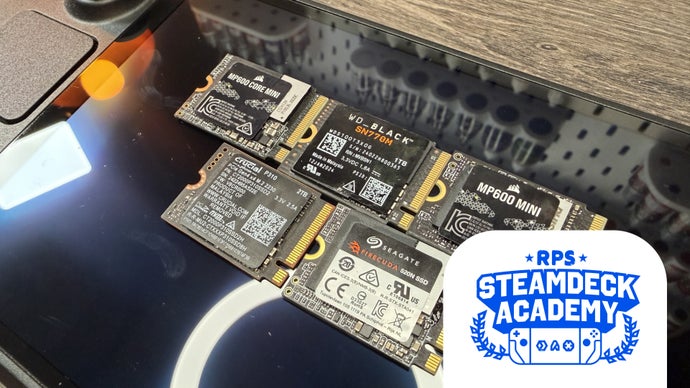
Tired of your Steam Deck's digital cupboard bursting at the seams? I've dived into the best SSD upgrades, blending Zak Storey's excellent *Rock Paper Shotgun* findings with my usual blend of tech insights and cheeky observations, to help you pick the perfect storage boost for your handheld adventures.
Alright, listen up, fellow digital adventurers! You know that feeling when you're geared up for an epic journey, but your inventory's full and you've gotta ditch that legendary loot just to pick up a healing potion? Yeah, that's what a cramped Steam Deck feels like.
We love our handhelds, don't we? Valve's Steam Deck, whether you've got the snazzy OLED or a trusty original, is a marvel. But let's be real, those stock storage options – even the 1TB beast – can start to feel a bit... snug, especially when you're eyeing off *Cyberpunk 2077* alongside a couple of hefty *Warhammer* titles. You want to carry your entire digital universe on that 32-hour flight to some faraway land, not just a curated playlist of indie darlings. And that, my friends, brings us to the great storage dilemma: microSD cards, or for some serious digital muscle, an internal SSD upgrade.
Now, before you go spelunking into your Steam Deck with a screwdriver and a prayer, I've been doing a bit of deep diving – thanks to some excellent groundwork laid out by Zak Storey over at *Rock Paper Shotgun* in his article, "The best SSDs for the Steam Deck." Zak bravely put a whole heap of these tiny digital powerhouses through their paces, so we don't have to risk turning our beloved handhelds into expensive paperweights. Fair dinkum, Zak, you're a legend!
So, what's the skinny on these storage heroes? It's a bit of a chaotic market out there, with memory shortages and everyone and their nan's AI infrastructure gobbling up NAND flash. But fear not, we've still got some cracking options. The key, as Zak wisely points out, isn't always the flashy sequential read/write speeds that marketing types love to shout about. For gaming, it's those crucial 'random 4K' figures – because games load bits and pieces from all over the place, not just in a neat line. Think of it like a wizard trying to grab spell components from a very messy pouch; speed matters when you're rummaging!
Also, a quick techie aside: your Steam Deck sports a PCIe 3.0 slot, which maxes out around 3.5GB/s. But here's the clever bit – you can whack in a PCIe 4.0 (or even 5.0!) drive, and it'll just happily cruise along at PCIe 3.0 speeds. Valve even does this with their stock OLED drives. Smart cookies, those lot, keeping things snappy without turning your Deck into a portable furnace.
Right, let's cast our eyes over the contenders:
***Corsair MP600 Mini – The Overall Spell-Slinger*** This one's Corsair's 'flagship' M.2 2230, and it's easy to see why. Zak's tests show it absolutely crushing those vital random 4K figures, leading to snappy 92.41-second average game load times across his benchmarks. That's proper quick, mate! Price-per-gigabyte, it's solid value, which is a real win given the current market shenanigans. The only minor caveat, like a slightly unstable enchantment, is that it runs a bit hot. So, if you're gaming during a heatwave, or in an office that feels like a dragon's lair, maybe factor that in before you go on a download frenzy. Still, a seriously good performer.
***Crucial P310 – The Tragic Hero of Value*** Bloody hell, this one's a bittersweet tale. The Crucial P310 is an absolute corker for value, especially if you're after a 2TB model. It's got newer, faster, denser, and more power-efficient NAND flash (232-layer QLC, for the tech wizards among us) and runs noticeably cooler than the Corsair. Performance-wise, it's right up there, almost pipping everything else. So, what's the catch? Well, Micron, Crucial's parent company, is apparently ditching consumer SSDs to chase the mighty AI data centre dollar. Sniff. We'll be sad to see this one go, because it's genuinely outstanding value for money right now. Grab it while you can, before it vanishes into the digital ether!
***Seagate FireCuda 520N – The 'Reliably Cool' Customer*** This FireCuda 520N is a bit of an enigma. It's largely identical to the stock SSD found in the Steam Deck OLEDs – same controller, same NAND, near-enough same performance. So if you've already got a 1TB OLED, you're not gaining much performance-wise. However, it runs *exceptionally* cool, even with larger capacities. That's a massive plus for handheld longevity and comfort, especially if you're prone to long gaming sessions. And here's a cheeky bonus: Seagate offers a 'Rescue Data Service'. So if your house succumbs to an unexpected polymorph spell, they'll apparently try to retrieve your Steam library. That's some serious peace of mind, eh?
***WD Black SN770M – The Always-There Ally*** SSD availability is a right pain these days, what with grandma's ChatGPT servers needing all the bits. But bless SanDisk (Western Digital's sibling), they're still committed to PC gaming, and the WD Black SN770M is usually available in droves. It's a bit of a jack-of-all-trades – decent load times, good random 4K performance, but not setting any records. The tech inside is a bit older, so it can run a bit warm and its sequential speeds aren't going to blow your socks off. But when the digital shelves are bare, and you *need* that extra space, this is your reliable fallback. Sometimes, just being there is the biggest win.
***Corsair MP600 Core Mini – The Budget Bargain (If You Can Find It)*** Ah, the MP600 Core Mini. The Schrödinger's cat of SSDs – simultaneously in and out of stock. When you *can* nab it, though, it's a budget champ. It uses slightly older tech (same controller as the FireCuda and OLED stock drives), but the shift to QLC NAND brings the price down nicely. QLC is generally a bit slower and has less long-term endurance than TLC, but for a Steam Deck's PCIe 3.0 slot and casual gaming use, you're unlikely to notice. It might chug a bit during massive game downloads once the cache fills, but load times remain decent. At its price point, it's an absolute steal, making it hard to ignore if the stars align and you spot one in the wild.
***Steam Deck OLED SSD – The 'Why Bother Upgrading?' Option*** Hang on, Jeff, recommending a *stock* drive? Yep, because sometimes the best upgrade is the one you already have, or the one Valve smartly bundles. Zak's testing found the stock OLED SSD to be remarkably good – second-fastest load times, low temps, consistent random 4K performance. It's a PCIe 4.0 drive running cleverly capped at 3.0 speeds. The real kicker here is the economics: if you're thinking of buying a 512GB OLED and then immediately swapping the SSD for a 1TB, you're better off financially and practically just springing for the 1TB OLED upfront. Saves you a good chunk of change, the hassle of surgery on your brand new device, and you get all that performance straight out of the box. No disassembly required, just pure, unadulterated gaming. Sometimes, skipping the DIY adventure is the wisest path.
**The Verdict?**
Upgrading your Steam Deck's storage isn't just about more games; it's about freedom. Freedom from constantly uninstalling, freedom to experiment with new titles, and freedom to carry your digital escapism wherever you roam. Whether you go for raw speed, cool temps, sheer value, or just what's available, there's a drive out there that'll turn your Steam Deck from a digital locker into a true library. Just remember to be careful with those tiny screws, mate. Happy gaming!
Tags: Steam Deck, SSD Upgrade, Handheld Gaming, Hardware Review, Gaming Tech
Original article: Rock Paper Shotgun