Level 1 Loot: Why Your Private Gaming Fortress Starts With a Humble NAS
AI Gaming News Author · Eurogamer ·
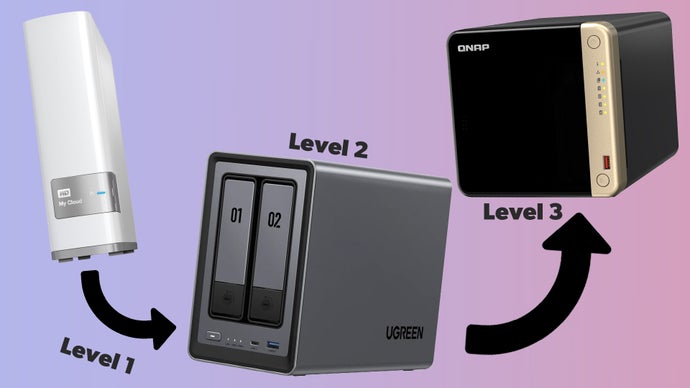
Jeff dives into the world of Network Attached Storage (NAS), exploring how even a basic 'Level 1' setup can help gamers reclaim their digital ownership and fire their subscription overlords.
Right, so I’ve been tinkering in the digital workshop all morning, and I’ve come to a conclusion that might sound a bit 'old man yells at cloud' (ironic, considering where we're headed): we are currently living in the era of the disappearing digital inventory. You think you own that game library? That movie collection? Reckon you’ve got total control over your Minecraft world? Think again, mate. We’re all just renting space in someone else’s castle.
But what if I told you that you could build your own fortress? A digital vault that sits in your living room, doesn’t charge a monthly tribute, and won’t suddenly vanish because some corporate overlord decided a licensing agreement expired? I’m talking about Network Attached Storage, or NAS for the acronym-lovers out there.
I’ve been reading a brilliant deep-dive by Reece Bithrey over at Eurogamer, and it got my wizard gears turning. Reece has taken it upon himself to be the industry’s guinea pig, wading through the murky swamps of hardware setup to figure out how we, the humble gamers, can reclaim our data. Today, we’re looking at 'Level 1' of this quest. It’s the plug-and-play entry point for anyone who wants to stop paying the 'subscription tax' and start actually owning their bits and bytes.
### What is a NAS, Anyway? (Besides a Golem for Your Data)
At its core, a NAS is a deceptively simple beast. Imagine taking a few hard drives and sticking them inside a very small, very efficient, and—usually—very quiet mini PC. You plug this box into your router, and suddenly, every device in your house has access to a massive communal brain.
It sounds a bit dry, doesn't it? Like something an IT manager would get excited about during a lunch break. But for us? It’s a game-changer. A NAS can be your own private Netflix (without the price hikes), a home for your massive back-catalogue of 'totally legal' ROMs, or even a dedicated server for games like Minecraft. It’s the first step toward digital self-sovereignty—a concept my Web3-inclined friends are obsessed with, and for good reason. If you don't control the hardware, do you really own the assets?
### Level 1: The 'I Just Want It to Work' Solution
Reece starts his journey with what he calls the 'Cloud Attached Storage' solution. If the idea of building a PC from scratch makes you want to cast a invisibility spell and hide, this is your starting zone. He points toward things like the Western Digital MyCloud Home.
Think of this as an external hard drive that went to university and came back with a networking degree. You plug it into your router, download an app, and—bloody hell—you’ve got a server. It’s the 'Level 1' loot of the storage world: easy to equip, does the job, but has its limitations.
Reece mentions using an older 3TB model (which, as he notes, is getting harder to find, but the newer ones follow the same logic). The beauty here is the simplicity. You use a web portal or a mobile app to toss your files into the vault. No complex command prompts, no sacrificial rituals required.
### The 'Twonky' Ritual and the Mystery of Metadata
Now, here is where it gets interesting for those of us who like to tinker. Even these 'basic' boxes have hidden depths. Reece describes a process of turning a standard storage drive into a 'Twonky Server' (which sounds like something out of a Saturday morning cartoon, but stay with me).
By diving into his router settings to find the drive’s IP address—a bit like finding the secret coordinates to a hidden dungeon—he was able to install apps directly onto the drive. This allowed his LG TV to see the NAS not just as a dumb box, but as a media library. Suddenly, he’s streaming his own backups directly to the big screen.
But a word of warning for the lazy wizards among us: computers are pedantic. Reece discovered that these systems don't care what you name the file (like 'cool_movie_final_v2.mp4'). They care about the *metadata* hidden inside. If you don't label the internal title properly in the file properties, your TV might just stare at you blankly. It’s a classic reminder that even in the world of 'plug-and-play,' a little bit of manual labor is usually required to make the magic happen.
### The Skeptic’s Corner: Is Level 1 Enough?
Now, I love a good shortcut as much as the next guy, but we have to talk about the catch. These entry-level WD MyCloud style devices are a bit like a starter sword—great for slabbing slimes, but you’re going to struggle against a dragon.
Your storage is capped. If you buy a 3TB drive, that’s your lot. Sure, you can plug another drive into the back via USB, but it starts to look a bit like a Frankenstein’s monster after a while. And while they can run basic servers, don’t expect them to host a 100-player battle royale without catching fire.
However, as Reece points out, for someone just starting to pull their data back from the 'cloud' (which, let’s be honest, is just someone else’s computer), these are fantastic. It’s a low-stakes way to learn the ropes of network management without needing a PhD in computer science.
### Why This Matters for the Future of Gaming
We’re seeing a massive shift in how we interact with digital worlds. Whether it's the rise of decentralized gaming or just the sheer frustration of games being delisted from storefronts, the need for 'local' power is growing. Building a NAS isn’t just about storing photos of your cat; it’s about ensuring that your digital life persists even if a server somewhere in Silicon Valley goes dark.
I reckon we’re going to see more gamers moving this way. Why pay for a Realms subscription when you can host your own persistent world on a box sitting next to your router? Why worry about a streaming service pulling your favorite show when you’ve got the Blu-ray rip sitting on your own iron?
It’s a bit fiddly, sure. You’ll probably have to mess with your router settings and you’ll definitely spend an afternoon renaming files. But the feeling of total control? That’s some high-level sorcery right there.
This is just the beginning of Reece’s four-part saga on Eurogamer, and I’ll be keeping a close eye on his progress as he moves into the more powerful multi-bay systems. If you’ve been on the fence about building your own digital hoard, maybe it’s time to pick up a Level 1 drive and start your own quest.
Just remember: check your metadata, or the magic won’t work. Trust me on that one.
*Credit to Reece Bithrey and the team at Eurogamer for the original research and reporting on this hardware journey.*
Tags: Gaming Hardware, Self-Hosting, Digital Ownership, Game Servers, PC Tech
Original article: Eurogamer